The feet on your keyboard are tilting it the wrong way
Almost every keyboard has flip-out legs at the back, almost everybody uses them, and they raise the end that should be lower. Folding them away is free, and it is a bigger change than the keyboard you were about to buy.
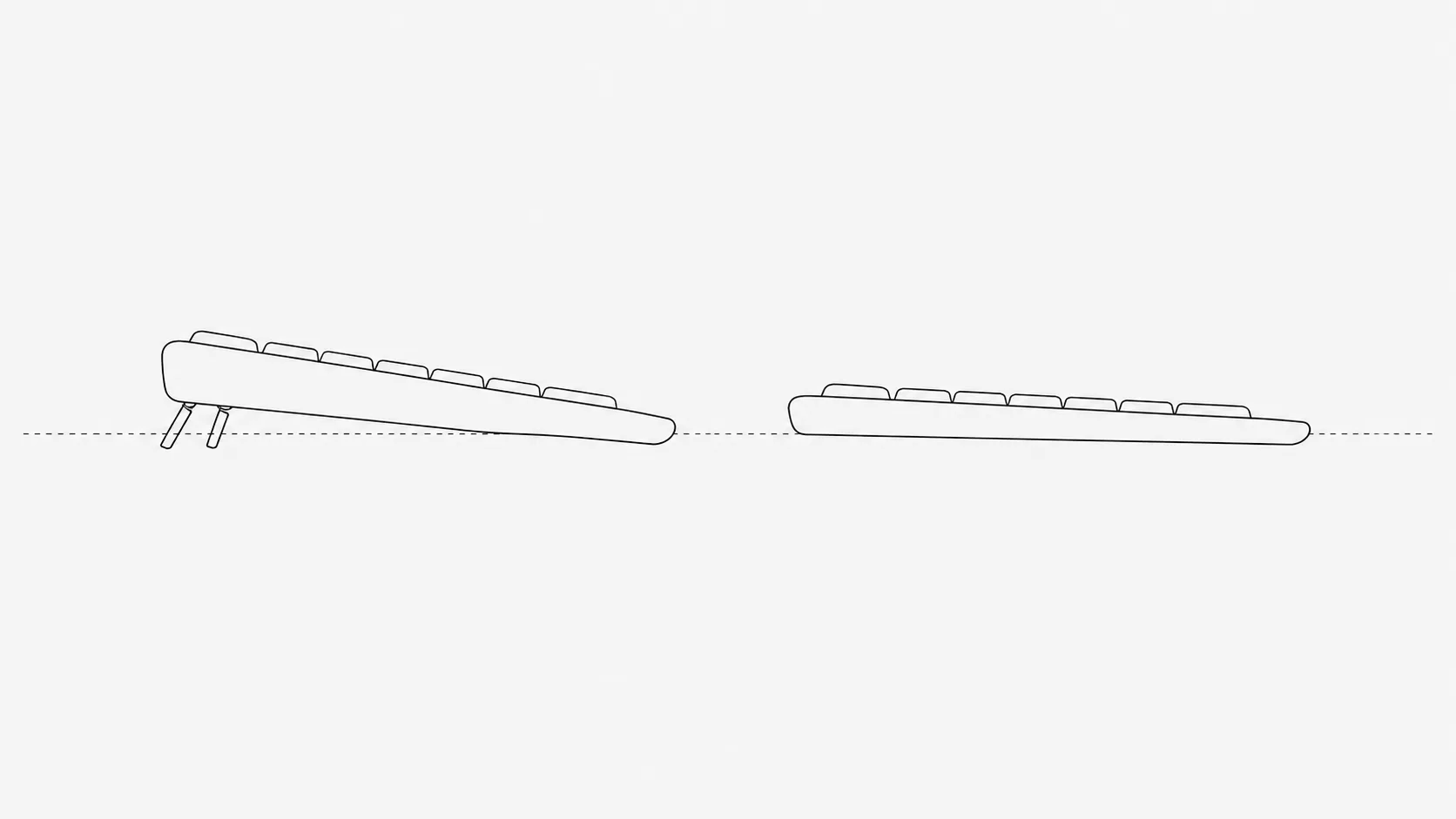
Turn a keyboard over. There are two small plastic legs at the back, folded flat. Almost everybody flips them out, because a keyboard angled towards you looks more readable and feels more deliberate, like the desk has been set up rather than just occupied.
They tilt it the wrong way. The reason is not obvious until you watch what your hand has to do to reach the keys.
What the legs do to your wrist
Rest a forearm on a desk and lay your hand flat. Now raise the far edge of whatever your hand is resting on. The fingers go up and the wrist bends backwards, which is called extension.
That is the legs. Raising the back of the keyboard means the hand has to tip back to meet the keys, so you type with the wrist held in extension for as long as you are typing. Extension narrows the carpal tunnel and raises the pressure inside it, and it runs the tendons through that tunnel around a corner instead of in a straight line.
The shape is inherited from typewriters, where the rows were physically stacked and there was no alternative. Then it stayed, long after the mechanism it existed for had gone, because by then it looked correct.
The slope ergonomists actually recommend
The recommendation coming out of the ergonomics literature is the opposite: flat, or sloping slightly away from you so the front edge sits higher than the back. That is called negative slope, and it keeps the wrist near neutral because the hand never has to tip up to reach anything.
Studies of negative-slope keyboard trays have reported less wrist extension and less discomfort than horizontal or positive-tilt setups. It is one of the steadier findings in desk ergonomics, which is a field where steady findings are not common.
Negative slope only works if the keyboard is low enough. Tilting it away from you on a desk that is already too high just makes you lift your shoulders to reach the keys, and you have swapped a wrist problem for a shoulder one. Elbow height is the test: your forearms want to be roughly level with the keys, or very slightly above them.
Flat gets you most of it
Most people are not going to mount a tray under their desk, and they should not have to. The large step is from tilted-up to flat, not from flat to negative. Fold the legs away and you have collected most of what is available, for nothing.
If you want the rest, a thin wedge or a couple of stacked coins under the front edge produces a few degrees of negative slope on an ordinary desk. It looks ridiculous. It also works, which is roughly the standard for ergonomics advice.
You are hitting the keys much harder than you need to
Studies of typing force keep finding the same thing: people strike keys with several times the force required to register them, commonly two to four times as much. The key bottoms out against the case and that impact travels back up into the finger and hand, thousands of times an hour.
Nobody decides to do this. It comes from learning on something with a heavier action, or from typing fast, or from being irritated at whatever you are typing. It is also one of the few desk habits under genuine conscious control, which makes it unusually easy to change compared with posture.
Spend a minute deliberately typing as lightly as the keyboard will allow. It feels strange and slow, and you will drift back inside the hour. The drift gets slower each time you do it, which is more than can be said for most of this.
Does the switch underneath matter
Mechanical keyboards get bought partly for how they feel and partly on a health argument: shorter travel, lighter actuation, less bottoming out. There is very little evidence on either side of it.
Studies comparing key travel and actuation force do find differences in typing force and in the muscle activity that goes with it. None of them connect those differences to who ends up in pain. The one part with a plain rationale is that a key needing less force to register asks slightly less of the finger, which is a small effect multiplied by a very large number of repetitions.
So buy the one you enjoy typing on. A light switch may encourage a lighter touch, or it may just let you bottom out faster and more often. The thing that reliably changes how hard you hit the keys is noticing that you are doing it.
Are split and ergonomic keyboards worth it
Split, tented and curved keyboards exist to fix two things the standard layout imposes. Your forearms have to angle inwards to reach a straight row of keys, and your hands have to turn further palm-down than is comfortable. Both are real, and the geometry does address them.
Whether that reduces pain is a weaker story than the price implies. Reviews of alternative keyboards for arm and hand complaints among office workers have found small improvements in some trials, low study quality throughout, and nothing that reads as a cure. People who already have symptoms tend to do better with them than people who do not, which makes sense and is also the group least likely to be reading about prevention.
The honest summary is that a split keyboard is a reasonable purchase if you type all day and something already hurts, a pleasant purchase if you just like them, and not the first thing to buy.
The number pad is a shoulder problem
A full-size keyboard is around ten centimetres wider than one without a number pad, and every one of those centimetres sits between your hands and your mouse.
That pushes the mouse arm further out for the whole day, and holding an arm away from the body at low effort for hours is what makes the top of one shoulder ache by mid afternoon. Unless you live in a spreadsheet, a keyboard without the number pad is one of the cheapest ergonomic upgrades available, and it is usually cheaper than the one it replaces.
What to change, in order
- 1Fold the legs down. Free, takes two seconds, and it is the largest single change most people have available.
- 2Fix the height. Elbows roughly at key height, shoulders relaxed. If the desk is too high, raise the chair and put something under your feet.
- 3Type more lightly for one minute a day until it stops feeling like a deliberate act.
- 4Drop the number pad if you are not using it, and move the mouse in beside the keyboard.
- 5Stop leaning on the wrist rest while typing. It is for pauses between bursts, and resting on it holds the joint in exactly the position you are trying to get out of.
- 6Then consider a split keyboard, if something still hurts after the free changes have had a few weeks to work.
Numbness or tingling in the thumb and first two fingers, particularly at night, weakness or dropping things, or pain that no longer settles over a weekend is worth taking to a clinician. Hand symptoms respond far better to early attention than to a year of trying keyboards.
The short version
The legs on the back of your keyboard raise the edge that should be lower, and typing with the wrists bent back is the position that puts the most pressure through the carpal tunnel. Fold them away. Get the keyboard to about elbow height, hit the keys more gently than feels natural, and bring the mouse in by dropping the number pad. A split keyboard can help if you already hurt, but it is the last item on the list rather than the first, and none of it matters as much as not typing for three hours without standing up.