A laptop cannot be ergonomic, and that is by design
The screen and the keyboard are bolted together, so one of them is always in the wrong place. Everything worth doing about it follows from admitting that.
There is no correct way to sit at a laptop. Not a difficult way, not a way most people get wrong. There is no correct way, and it is not a manufacturing oversight.
Your hands want the keyboard at about elbow height. Your eyes want the screen roughly at eye height. On a laptop those two things are hinged together about thirty centimetres apart, so you can satisfy one of them at a time. Put the keyboard where your hands want it and the screen sits in your lap. Raise the screen and you are typing at chest height.
Which compromise people pick
Almost everyone picks the same one without thinking about it: keyboard correct, screen low, head tipped forward for the rest of the day. It is the natural choice because your hands give constant feedback and your neck stays quiet until about three in the afternoon.
That is why laptop users report more neck and shoulder complaints than desktop users in occupational surveys, and why the effect gets stronger the more hours a day they spend on it. It is not that laptops are dangerous. It is that the compromise everyone picks loads the part that complains latest.
If you use a laptop for an hour a day, none of this matters much. The advice below is for people doing six or eight hours on one, which is now most people who work on a laptop at all.
The only real fix
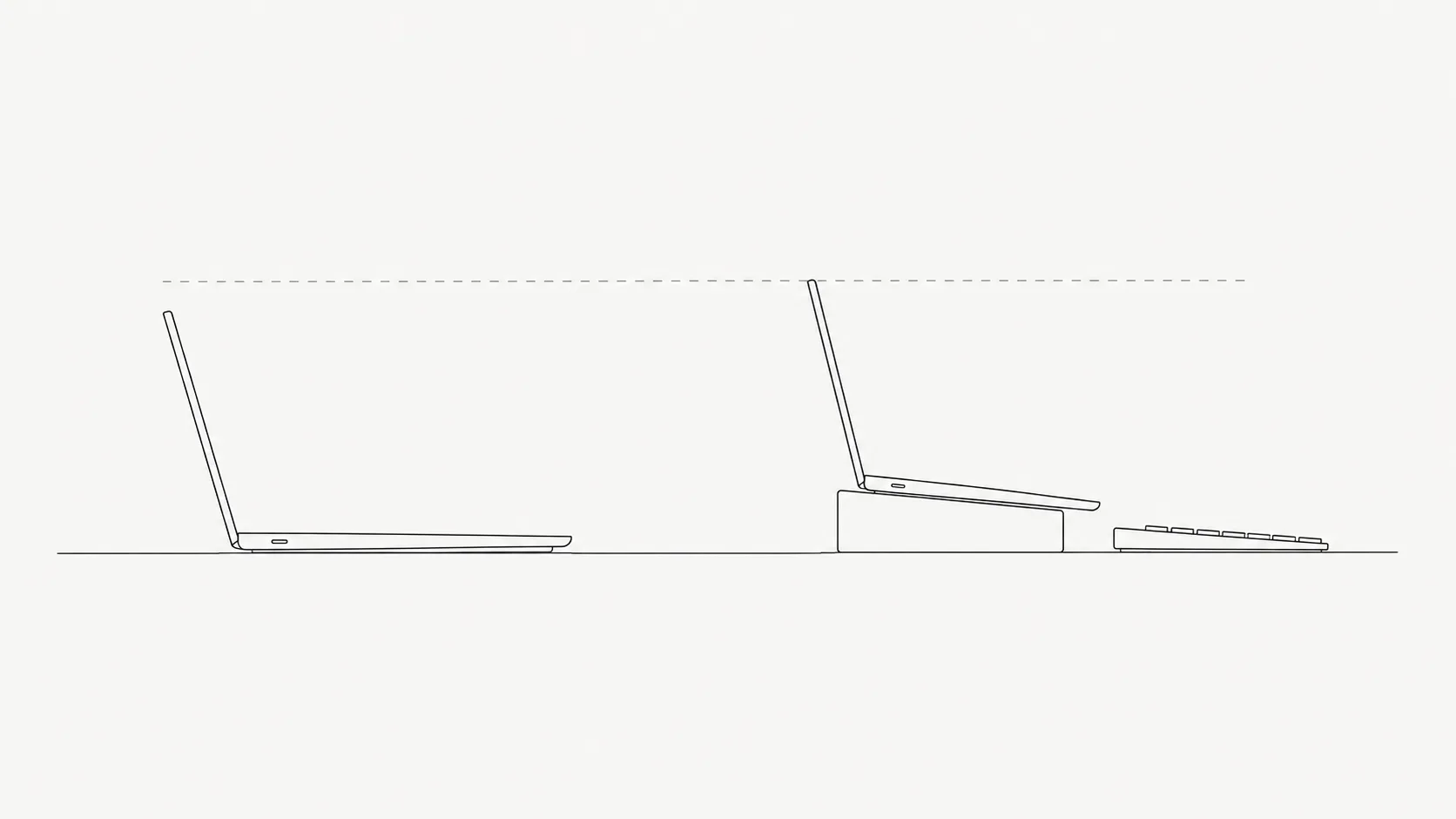
Separate the two halves. Everything else is damage control. Once the screen and the keyboard are independent, each can go where it should, and the problem simply stops existing.
- Laptop on a stand, external keyboard and mouse below it. The cheapest complete solution. A stand and a basic keyboard cost less than one bad month of physio.
- External monitor, laptop closed or beside it. Better if you want more screen anyway. The laptop screen makes a decent second display if you angle it.
- Books under the laptop. Genuinely fine. The stand is not doing anything magic. It is holding the screen up.
The rule for height is the same as any monitor: the top of the screen roughly level with your eyes, so your gaze falls slightly downward into the middle of it. If you wear varifocals, lower it further, because otherwise you will tip your head back to find the reading section and trade a sore neck for a differently sore neck.
When you cannot separate them
Trains, kitchen tables, hotel rooms, sofas. The honest answer here is not a posture. It is a time limit, because every laptop-only position is a compromise and the only variable you control is how long you hold it.
| Where you are | Best available compromise |
|---|---|
| Kitchen or dining table | Table height is usually too high for typing and too low for the screen. Sit on a cushion to raise yourself, and accept a short session. |
| Sofa, laptop on lap | The worst one for your neck. Put a cushion under the laptop to bring the screen up. Cap it at half an hour. |
| Train or plane | Screen almost in your lap and no room to fix it. Treat it as reading and messages, not three hours of deep work. |
| Standing at a counter | Usually good for the hands, terrible for the screen. Fine for twenty minutes of email. |
Notice that every row ends in a duration rather than a posture. That is not evasion, it is the actual answer. A bad position for twenty minutes is unremarkable. The same position for five hours is where the complaints come from.
The trackpad problem nobody mentions
A laptop trackpad sits directly in front of the keyboard, which is the one place a pointing device should never be, because it forces your wrists inward and your forearms to rotate. Add the fact that most laptop work involves far more pointing than typing, and a lot of what gets blamed on the keyboard is actually the trackpad.
An external mouse is the single cheapest improvement most laptop users can make, and it takes effect the same day. Keep it close to the keyboard rather than out to the side, or you swap a wrist problem for a shoulder one.
What to actually do
In order of how much they matter
- Raise the screen and add an external keyboard wherever you work for more than an hour or two. This is the whole article in one line.
- Add a mouse before you add anything else if you are only going to buy one thing.
- Set your text size larger than feels necessary. Small text on a small screen is why people lean in, and leaning in is why the neck goes.
- Cap your unsupported sessions. Sofa and train work is fine in twenty to thirty minute blocks and unpleasant in three hour ones.
- Change position often wherever you are. It matters more than which compromise you picked.
What is not worth buying
Lap desks with built-in cushions mostly raise the whole laptop, which keeps the geometry identical and adds heat. Ergonomic mouse mats with gel wrist rests encourage you to plant your wrist and pivot on it, which is the position that gets people into trouble in the first place. Posture braces do not survive contact with a laptop any better than they survive contact with a desk.
The short version
A laptop asks you to choose between your hands and your neck, and almost everyone silently chooses their hands. You cannot fix that by sitting better, because the geometry is fixed. Raise the screen, put a keyboard under it, and the problem is gone. When you cannot do that, stop trying to find the right position and set a limit instead.