You are squinting at the light behind you
Screen brightness gets all the blame and it is rarely the problem. What tires your eyes is the difference between the screen and everything around it.
When eyes ache at a desk, the first thing anyone touches is the brightness slider. It rarely fixes anything, and after a while people conclude their eyes are simply getting worse.
Your eyes are not responding to the screen on its own. They are responding to the difference between the screen and everything surrounding it, and that difference is set by the room.
Contrast, not brightness
Your pupil has one setting for your whole field of view. It cannot open for the dim wall behind your monitor and close for the bright document on it, so it compromises, and it keeps re-compromising every time your gaze moves.
That constant readjustment is a large part of what gets called screen fatigue. Lighting guidance is built around it: the ratio between your screen and its immediate surroundings should be modest, and the further from the screen you look, the more variation is tolerable. A bright screen in a dark room breaks that badly. So does a dim screen against a window.
This is why turning the brightness down in a dark room usually makes things worse rather than better. You have reduced the light reaching your eye, but the ratio between screen and wall is the thing that was hurting, and lowering the screen does not necessarily improve it.
The two ways a window ruins a desk
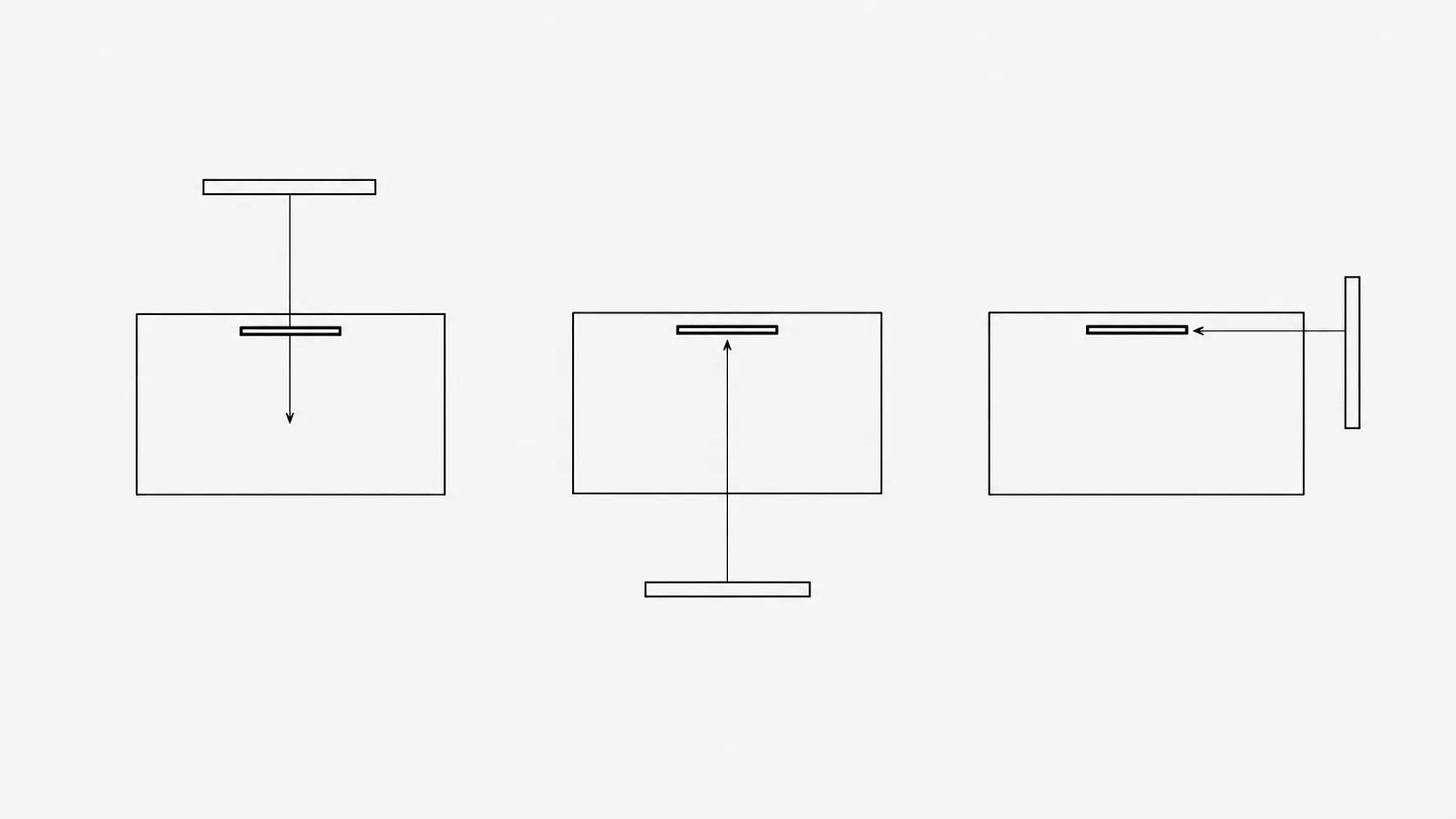
Almost every genuinely bad desk in an office is bad because of where the window is, and there are only two failure modes.
- Window behind the screen. You are looking at a dark rectangle in front of a bright rectangle, all day. Your pupil closes for the window and the screen goes muddy, so you turn the brightness up, which does not help because the window is still winning.
- Window behind you. Now it is reflected in the screen. You lose contrast in whatever you are reading and you unconsciously lean and tilt to see around your own reflection, which is where the neck ache comes from.
- Window to the side is the answer, with the screen perpendicular to it. This is not an aesthetic preference. It is the only arrangement where the window lights the room without either fighting the screen or bouncing off it.
If a desk cannot be turned, blinds solve most of it. Vertical blinds on a side window and horizontal on a window you face, angled up so light reaches the ceiling rather than your eyes.
Overhead lighting is the wrong shape
Ceiling lighting is designed to fill a room evenly, which is the correct goal for a corridor and the wrong one for a desk. It puts light on the top of your screen, in your eyes at the edges of your vision, and nowhere useful for reading paper.
General office guidance lands somewhere around 300 to 500 lux for desk work, which is far below daylight and well above the average living room being used as an office. The practical version is that a single overhead source is almost never enough on its own, and a lamp near the desk does more than a brighter ceiling.
Working out what is wrong with yours
| What you notice | What it usually is |
|---|---|
| Squinting, screen looks washed out | Something bright behind the screen. Usually a window. |
| Leaning and tilting to read, ache in the neck | A reflection you are working around without noticing. |
| Fine all day, sore once it gets dark outside | The room dimmed and the screen did not. Classic evening contrast problem. |
| Headache across the forehead in a bright office | Glare from overhead fittings in your peripheral vision. |
| Eyes gritty and dry rather than aching | Not lighting. That is blink rate, and it has its own fix. |
There is a quick test for the reflection case. Turn the screen off and look at it. Anything you can see in the black glass, a window, a lamp, a bright wall, your own shirt, is sitting on top of everything you read all day.
What to change
In order of how much they matter
- Turn the desk so the window is to one side. Free, takes a minute, and it fixes both window failures at once.
- Add a lamp beside the screen, not behind you. Aimed at your desk or at the wall behind the monitor. Lifting the surround toward the screen is what closes the ratio.
- Match the screen to the room, not to the maximum. A white page on screen should look like a sheet of paper on the desk, not like a light source.
- Turn the ceiling light down or off if you have a desk lamp. Two dim sources beat one bright one directly above you.
- Deal with reflections physically. Move the lamp, angle the blind, tilt the screen slightly downward. Matte screens help; anti-glare films mostly just soften everything.
What is oversold
Blue-light filters are sold for eye strain specifically, and reviews of the lenses have not found they reduce it. Warm colour temperature in the evening is pleasant and does not address contrast at all.
Flicker is real but mostly historical. Old fluorescent tubes with magnetic ballasts flickered at a rate some people perceive; modern LED fittings and screens rarely do. Cheap dimmable LEDs at low settings are the exception, and if a specific lamp gives you a headache, replace that lamp rather than the room.
The short version
Your eyes are not reacting to the screen, they are reacting to how different it is from everything around it. Get the window to your side, put a lamp near the screen rather than behind you, and set the screen to look like paper rather than a torch. Then check what is reflected in it while it is switched off, because whatever you find there has been in front of every document you read this year.