Your eyes are not tired. They are dry.
Burning, gritty, blurry by mid-afternoon. Two mechanisms cause almost all of it, and neither one is blue light.
By four in the afternoon your eyes feel hot, slightly gritty, and text has gone soft at the edges until you blink hard. Most people call this tired eyes and assume it is the price of the job.
It is two specific things, both of which respond well to changes that take about five minutes. Neither of them is the one the internet sells glasses for.
Mechanism one: you stopped blinking
At rest you blink somewhere around fifteen to twenty times a minute. Put a screen in front of a person and that drops by roughly half or more, and a large share of the blinks that remain are incomplete, meaning the lid never fully closes and the lower part of the eye surface is never resurfaced.
Each blink spreads the tear film. Without enough of them the film thins and breaks up between blinks, and exposed corneal surface is what produces the burning and the sandy feeling. The blur that clears the instant you blink is the same thing: you are looking through a tear film that has gone patchy.
It is worth sitting with how odd this is. Concentration suppresses blinking. The harder you are working, the drier your eyes get.
Mechanism two: your focusing muscles never let go
Focusing on something close requires a small muscle inside the eye to hold a contraction, and your eyes to turn slightly inward to converge on the same point. Both are effortful, and at a screen you hold them at nearly the same distance for hours with no chance to release.
That is the deep ache behind the eyes, the headache across the brow, and the few seconds of blur when you look up at something across the room and it takes a moment to sharpen. Your focusing system is stuck near and has to be talked back out.
Blue light is not the villain
This needs saying directly, because a whole product category depends on it not being said. A 2023 Cochrane review pulled together the randomised trials on blue-light filtering spectacle lenses and found they probably make little or no difference to eye strain from computer use. The trials were mostly small and short, so the door is not sealed shut, but the honest summary is that there is no good evidence they help.
It makes sense once you look at the mechanisms. Neither low blink rate nor sustained focusing effort has anything to do with the colour of the light. Filtering blue does not make you blink.
Light at night and sleep is a separate question, and there the total brightness matters more than the colour. That is an argument for dimming the room in the evening, not for wearing tinted lenses at 11am.
What actually helps
Move your screen, before anything else
Two adjustments, both free, both worth more than any exercise below.
- Push it back to arm's length, 50 to 70 centimetres. Closer means a stronger focusing effort held all day. If the text is too small, raise the font size rather than moving the screen.
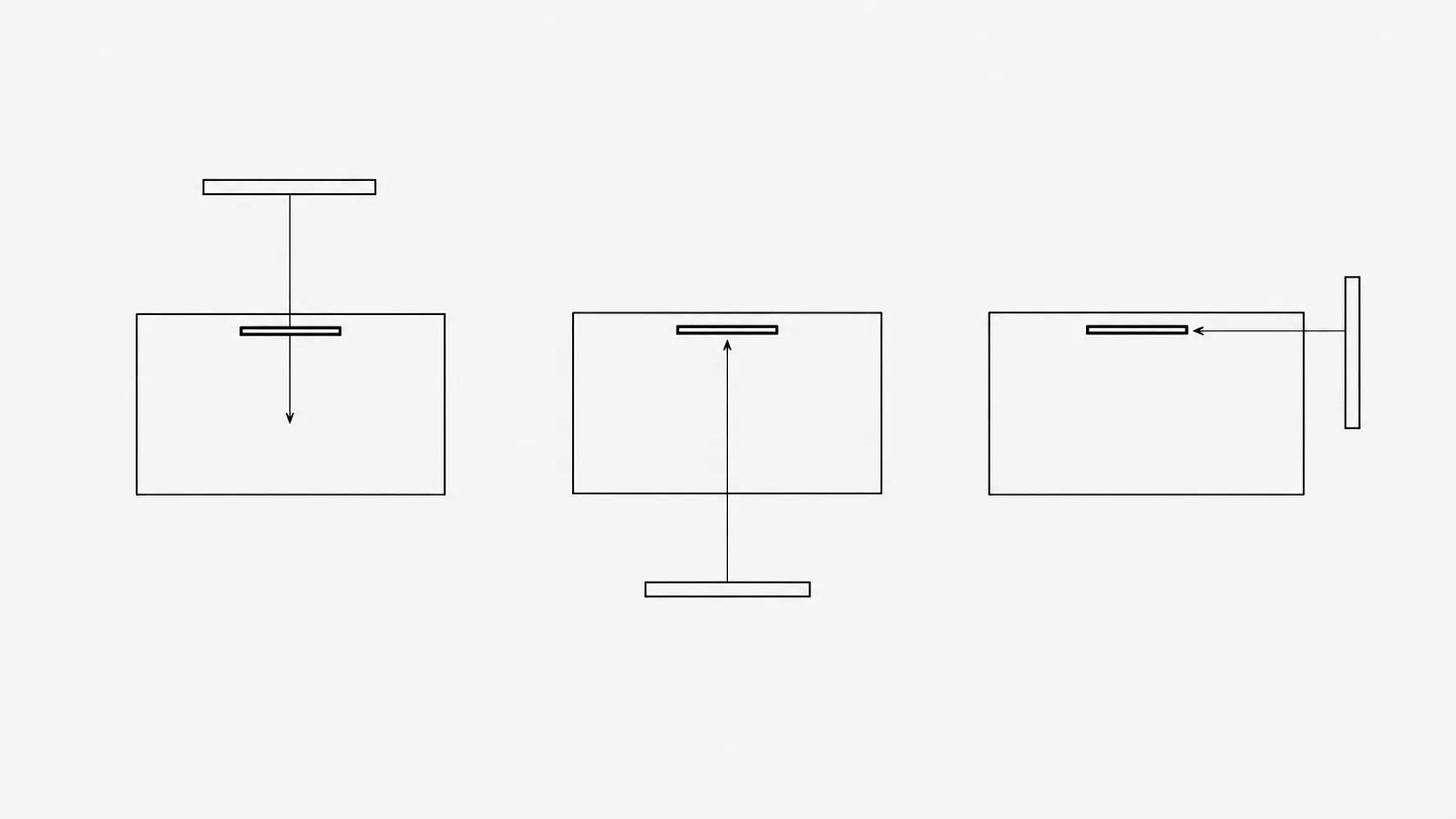
- Drop it slightly, so the top edge is at or just below eye level and you look a little downward. Looking down means your lids cover more of the eye, which slows tear evaporation. A screen mounted high leaves your eyes wide open at the ceiling for eight hours.
The 20-20-20 rule
Every twenty minutes, look at something at least twenty feet away, about six metres, for twenty seconds. It gives the focusing muscle a genuine release and it usually triggers a few full blinks on the way.
The specific numbers are a memorable slogan rather than an experimental result, and studies testing it directly have been mixed. The underlying idea, that regular distance viewing and short breaks reduce symptoms, holds up better than the exact intervals do. Treat it as a good habit, not a prescription.
Blink on purpose
Ten slow, complete blinks, closing gently and fully each time, with a light squeeze on the last one. Ten seconds. Do it at the start of every distance break and it turns one habit into two.
Fix the air
Dry eyes are partly a room problem. Air conditioning, heating and fans all speed evaporation, and a vent pointed at your face will beat any amount of blinking discipline. Move the seat or redirect the vent. If you wear contact lenses, all of this hits you harder and sooner.
Sort out the glare
A window directly behind your screen makes you fight a bright background all day. A window directly behind you puts its reflection on the glass. Sideways is the answer. Screen brightness should roughly match the room, so a screen that looks like a lamp in a dim room is too bright, and one you are squinting at next to a sunny window is too dim.
The screen settings worth changing
Most people set brightness once, on the day they bought the machine, in a shop. Four settings are worth a minute each.
- Brightness matched to the room, not maximised. Hold a sheet of white paper next to the screen. If the screen is clearly brighter than the paper, turn it down. If the paper is brighter, turn it up. Redo it when the daylight changes.
- Text size up. The most common reason people lean towards a screen is that the text is slightly too small to read comfortably at arm's length. Raising it costs nothing and removes the cause rather than the symptom.
- Contrast left alone, mostly. Black on white or white on black is fine. Grey text on a grey background is what forces the extra effort, and it is unfortunately fashionable.
- Refresh rate at its maximum. Flicker on some displays is perceptible below the threshold you would consciously notice, and higher is free if the hardware supports it.
Dark mode deserves a mention because it gets recommended for eye strain constantly. For most people in a normally lit room, light text on a dark background is slightly harder to read, not easier, because the pupil opens wider and focus becomes marginally less precise. In a dim room at night it is genuinely more comfortable. Use it where it helps and ignore the claim that it protects your eyes.
What eye exercises cannot do
They cannot change your prescription. Short-sightedness, long-sightedness and astigmatism are the physical shape of the eye, and no routine of rolling or focusing drills reshapes it. Programmes promising you will throw away your glasses are selling something that has never held up.
What is real is convergence insufficiency, a genuine and fairly common condition where the eyes struggle to turn inward together for near work. It causes exactly the symptoms above, it is diagnosed by an optometrist, and it responds to prescribed vision therapy. That is a real treatment for a real diagnosis, which is a different thing from an exercise routine off the internet.
When to stop reading and book an appointment
- Symptoms that persist after a couple of weeks of the setup changes above.
- Headaches that reliably follow screen work.
- Double vision, or words that swim and merge when you read.
- One eye noticeably worse than the other.
- Persistent redness, discharge, or pain rather than discomfort.
None of this is a substitute for an eye test. If you have not had one in two years and you look at a screen all day, that is the highest-value thing on this page.
The part you will not do on your own
You will not remember to look away every twenty minutes. Nobody does, because the reminder has to arrive during exactly the concentration that makes you unaware of time. And you will drift towards the screen through the afternoon without ever catching yourself doing it.
TryWorkWell handles both. Eye break reminders on an interval you set, and a screen distance alert that speaks up when you have crept too close, which is the single change most people need and the one they never notice needing.